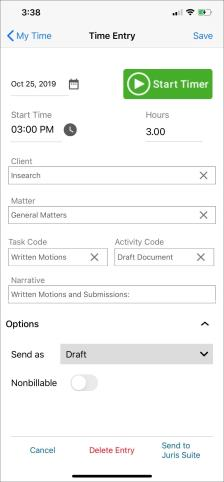
There is a Nonbillable toggle in the options menu at the bottom of a time entry, when permitted. Juris Go understands the Matter status of an entry, and will set the status to the same billability status as the default setting.
-
Automatic Nonbillable Status: If a matter is set up as nonbillable, all time for that matter will have nonbillable status by default.
-
Specify Nonbillable Time: If you are permitted, you can designate individual time as nonbillable.
-
Filter My Time Lists by Billable Status: You can choose to show only billable time, only nonbillable time, or both using the settings found by tapping the Filter
icon and opening the Status filter settings.
Juris Go will honor Juris Suite permissions. If a timekeeper cannot change the billability status in Juris Suite, they also cannot change the billability status in Juris Go.